
Shared Device Attendance App for Small Offices: How It Works
See how a shared office attendance app works with one company Android phone, GPS/geofence checks, live selfie evidence and a central attendance register.
A small office does not always need every employee to install an attendance app on a personal phone.
For many shops, clinics, warehouses, workshops and fixed-location offices, a simpler model is to keep one company-controlled Android phone at the workplace and let employees mark attendance from that shared device.
That is the idea behind Kavit Shared Office Attendance.
The shared phone is not just an employee phone being passed around. It is paired and approved as an attendance device for that business, tied to an approved workplace, and then used by eligible employees to mark attendance.
Quick answer: A shared-device attendance app lets several employees use one approved workplace phone for attendance. In Kavit, the office phone verifies the workplace, the employee selects their name, captures a live selfie and marks attendance; the resulting record is available centrally to the owner.
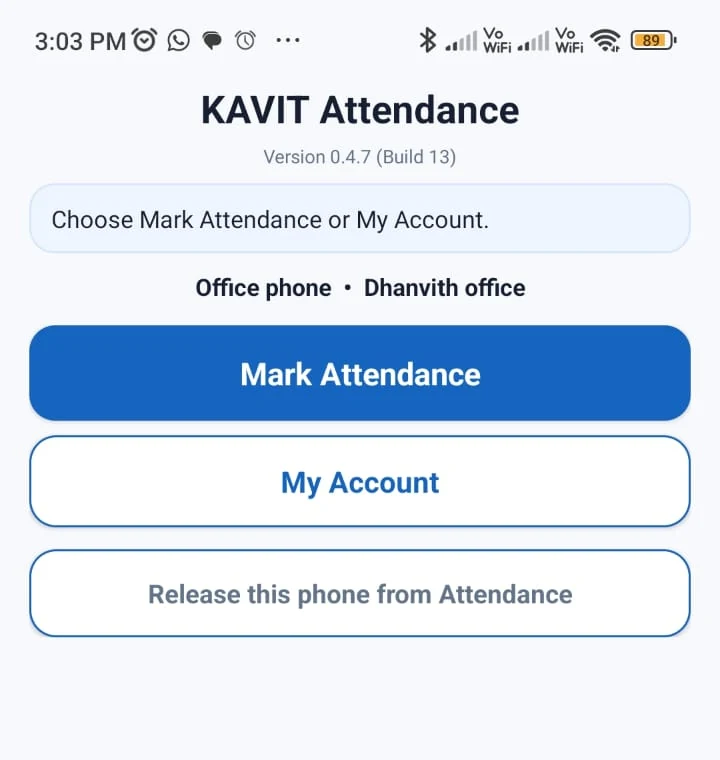
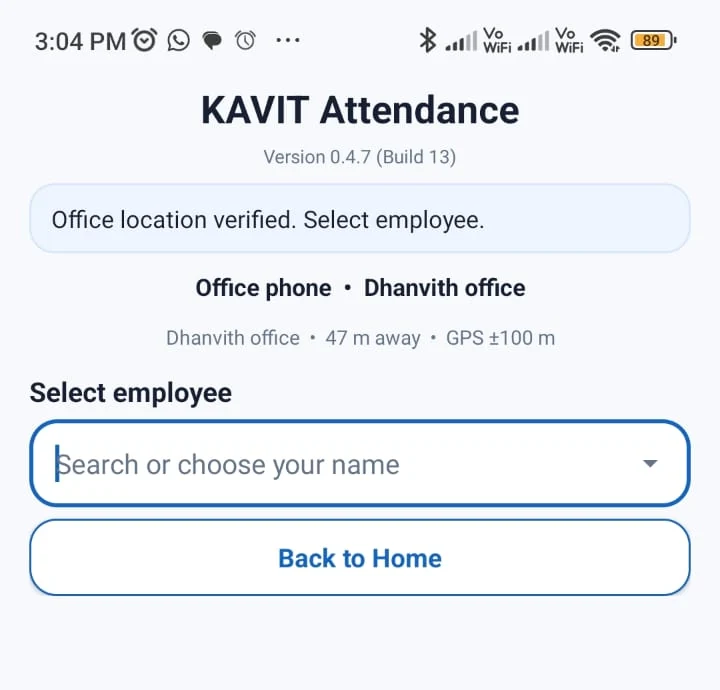
This guide uses real Kavit screenshots from an office setup. Employee-identifying information has been blurred where needed for public display.
What is a shared-device attendance app?
A shared-device attendance app turns one workplace phone into a common attendance point.
Instead of asking every employee to install an app, sign in with an individual Kavit account and use a personal phone for every punch, the business keeps one approved Android phone at the workplace.
Employees then use that phone to:
- tap Mark Attendance;
- select their name;
- complete the workplace-location check;
- capture a live selfie; and
- submit the attendance event.
For a fixed workplace, this can feel much closer to an attendance kiosk — without requiring a dedicated fingerprint or biometric machine.
How Kavit Shared Office Attendance works
Kavit separates the normal business login from the attendance-device identity.
An authorized Kavit user creates a Shared Office device invitation. The office phone accepts that invitation and is paired to the business and an approved Attendance location.
After pairing, the phone uses its approved device credential for attendance. Employees marking attendance on the shared phone do not need their own Kavit application login.
That distinction matters.
The Google account used to set up the office phone can still have ordinary Kavit permissions such as Manufacturing or other business access. Shared Office attendance is an additional device role; it does not replace those normal business permissions.
Step 1: one office phone becomes the attendance point
The Shared Office home screen is deliberately simple. The main employee action is Mark Attendance.
The employee does not need to understand device pairing, GPS coordinates or geofence calculations.
Step 2: Kavit verifies the approved workplace
After Mark Attendance is tapped, Kavit checks the office location before the employee proceeds.
Kavit is trying to answer a narrow attendance question:
Is this approved attendance device at an approved workplace when attendance is being marked?
The phone reports its location, while the backend remains authoritative for the workplace/geofence decision.
Kavit is not positioned as continuous employee-location surveillance. Location is checked when required for attendance-related security events.
For Shared Office attendance, a recently verified device location can be reused briefly so a queue of employees does not have to wait for a fresh GPS acquisition before every punch.
The configured attendance radius should reflect the real GPS conditions of the workplace rather than being made artificially tight.
Step 3: the employee selects their name
Once the workplace location is accepted, the shared phone shows employees who are eligible to mark attendance through that device.
This is one of the main differences between Shared Office and Personal Mobile attendance:
- Shared Office: one approved workplace phone can be used by multiple eligible employees.
- Personal Mobile: the approved phone is bound server-side to one employee.
A Shared Office phone is therefore especially useful when most of the team starts or finishes work at the same fixed location.
Step 4: Kavit captures a live selfie
After an employee is selected, Kavit captures a live selfie before the attendance event is submitted.
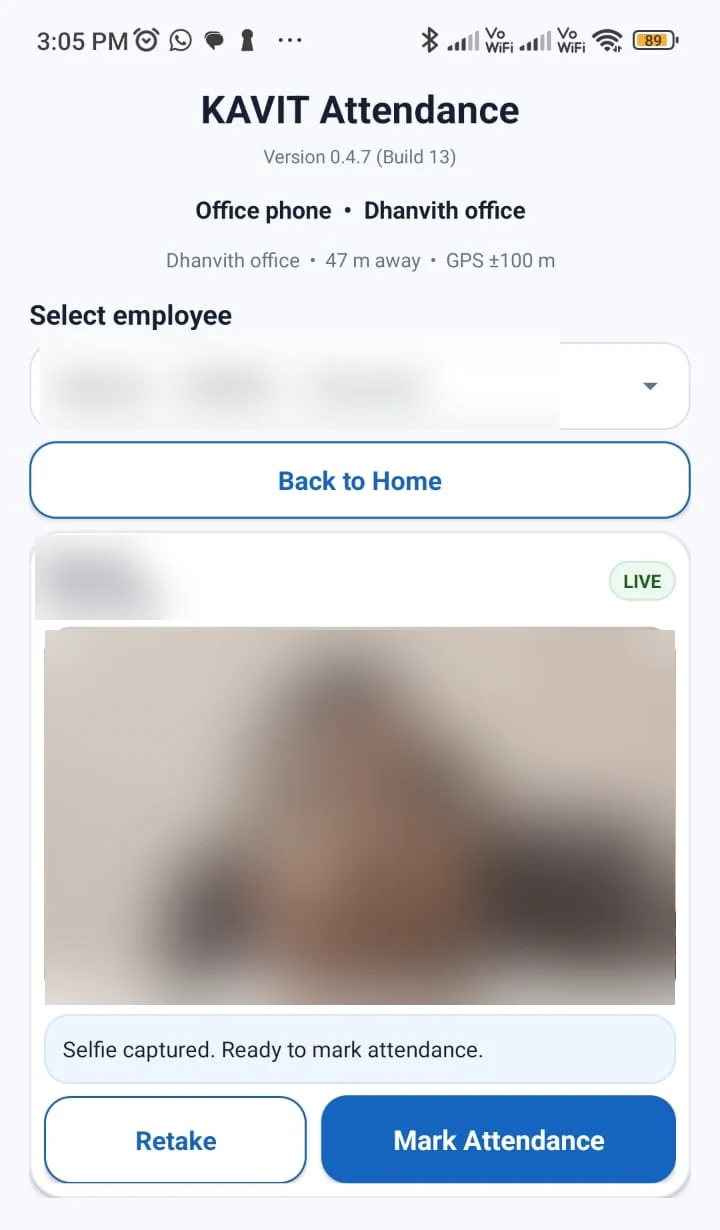
The selfie gives the owner or authorized reviewer supporting evidence for the punch.
Kavit’s current attendance acceptance flow does not require face recognition or liveness matching. The selfie is evidence attached to the attendance event rather than an automatic face-matching gate.
That distinction is intentional.
A small business can gain useful attendance evidence without making automatic biometric identification a prerequisite for every punch.
How long is the selfie retained?
Kavit’s current workforce requirement retains attendance selfie evidence for 40 days.
After that retention period, the selfie image is deleted while the underlying attendance history remains.
The business can therefore retain the attendance record without keeping the supporting image indefinitely.
Step 5: the employee uses one simple attendance action
Kavit uses one Mark Attendance action.
The employee does not decide whether the event is IN or OUT. The backend determines the event sequence and records the official attendance time server-side.
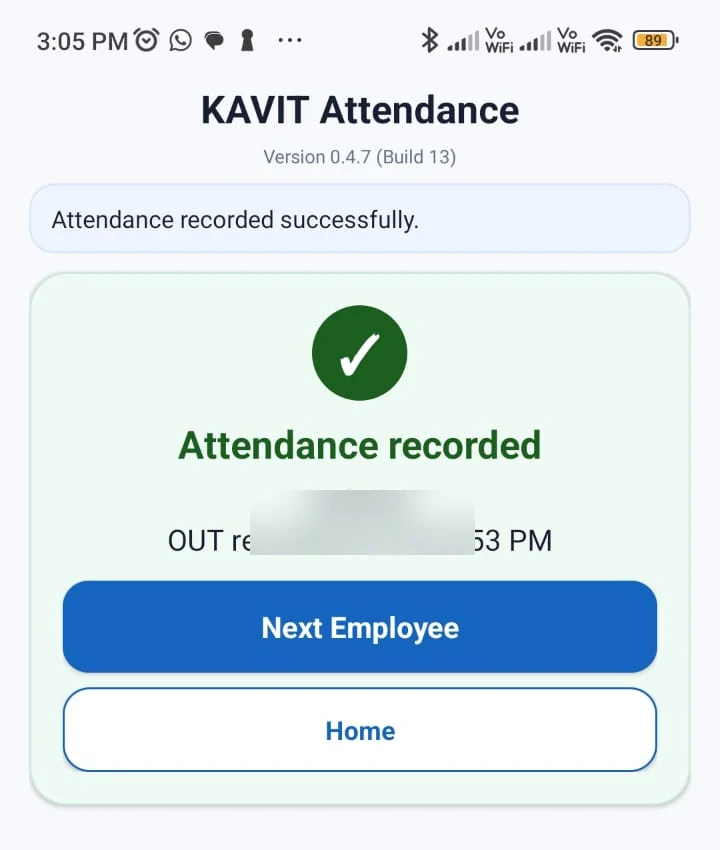
The Next Employee action is important for a common office phone: one employee finishes and the device is immediately ready for the next person.
Step 6: the owner sees attendance centrally
The shared phone is the capture point. The useful business record is available in Kavit Web.
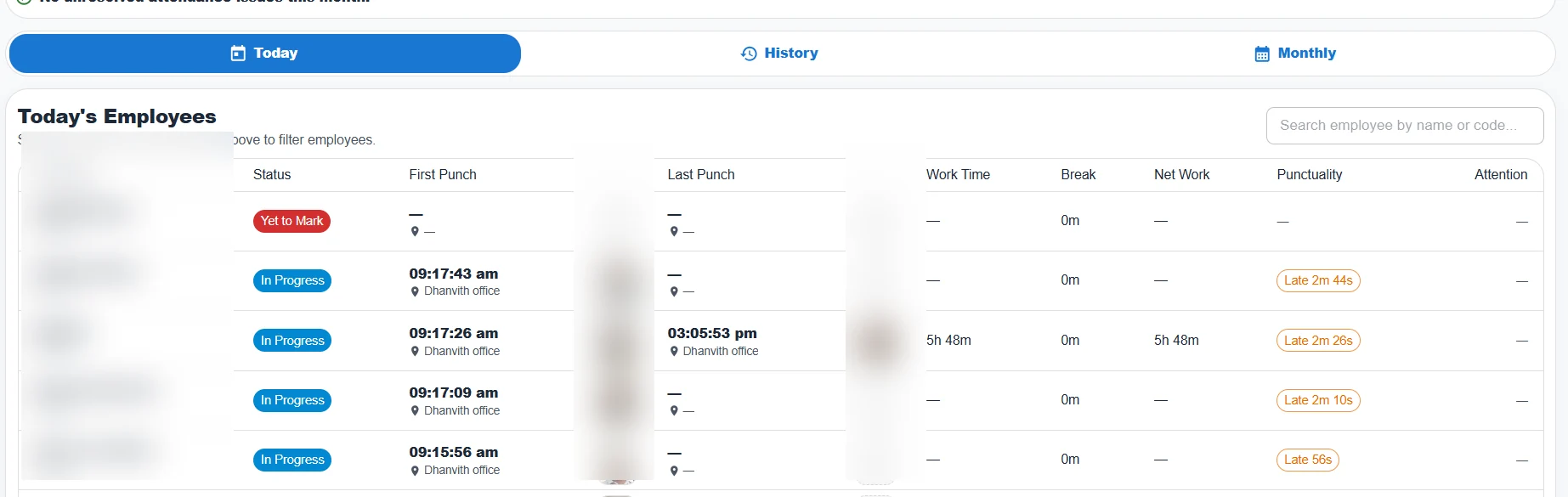
The owner or authorized user can review information such as:
- attendance status;
- first punch;
- last punch;
- approved workplace;
- work time;
- break information where applicable;
- net work time;
- punctuality context; and
- selfie evidence while it is within the retention period.
So the workflow is not simply take selfie and store a photo.
It is:
approved office device -> workplace check -> employee -> live selfie -> server-recorded attendance -> central attendance register
What does Kavit verify on a Shared Office punch?
A useful attendance system should be clear about what it checks.
1. Approved attendance device
The phone is registered to the business as an Attendance device. An arbitrary unregistered phone should not be able to submit attendance as that office device.
2. Business and workplace binding
The device belongs to its approved business/store and Attendance location.
3. Location / geofence
The attendance event must satisfy the configured workplace-location rules. The backend remains authoritative for the geofence decision.
4. Live selfie evidence
A fresh selfie is captured for the physical attendance punch.
The current workflow treats this as private supporting evidence, not as an automatic face-recognition acceptance gate.
5. Server-authoritative attendance event
Employees do not choose IN or OUT, and the phone’s local clock is not the final authority for the punch.
Shared Office vs Personal Mobile attendance
Both models can be useful, but they solve different operational problems.
| Shared Office | Personal Mobile | |
|---|---|---|
| Phone belongs to | Workplace / business | Individual employee |
| Who can mark attendance | Multiple eligible employees | Only the bound employee |
| Employee selection | Yes | No authorization by employee picker |
| Best for | Fixed office, shop, clinic, warehouse, workshop | Eligible employee using approved fixed workplaces |
| Personal app required for every employee | No | Yes, for employees using Personal Mobile |
| Location check | Approved workplace | Approved workplace |
| Selfie for attendance punch | Yes | Yes |
| Continuous tracking | No | No |
| Attendance visible centrally | Yes | Yes |
A business does not necessarily need one attendance model for every employee.
Some employees may be Shared Office only, some Personal Mobile only, and the business can permit both models where appropriate.
When is one shared attendance phone a good fit?
Shared-device attendance is especially practical when employees normally report to the same fixed workplace.
Examples include:
- retail shops;
- small offices;
- clinics;
- warehouses;
- garment units;
- workshops;
- restaurants and back-office teams;
- coaching centres; and
- other teams with a common attendance point.
The main advantage is operational simplicity.
The business does not have to depend on every employee carrying a compatible personal phone, maintaining an app login and troubleshooting individual setup just to mark attendance.
A company-controlled phone can stay charged, connected and available at the workplace.
When is Shared Office not enough?
A shared office phone is not the right answer for every workforce.
If employees regularly use different approved fixed workplaces, a registered Personal Mobile workflow may be more practical for those employees.
And if the requirement is unrestricted customer-visit or roaming-field attendance, that is a different product problem.
Kavit’s current attendance model is based on configured, approved workplace locations. It should not be described as arbitrary anywhere-attendance for roaming field staff.
Attendance is more useful when it continues beyond the punch
Attendance collection is only the first part of the monthly workflow.
The owner eventually needs to understand:
- full and half days;
- absences;
- paid and unpaid leave;
- missing or exceptional attendance;
- working time;
- late/early context;
- approved corrections; and
- the attendance basis used for salary review.
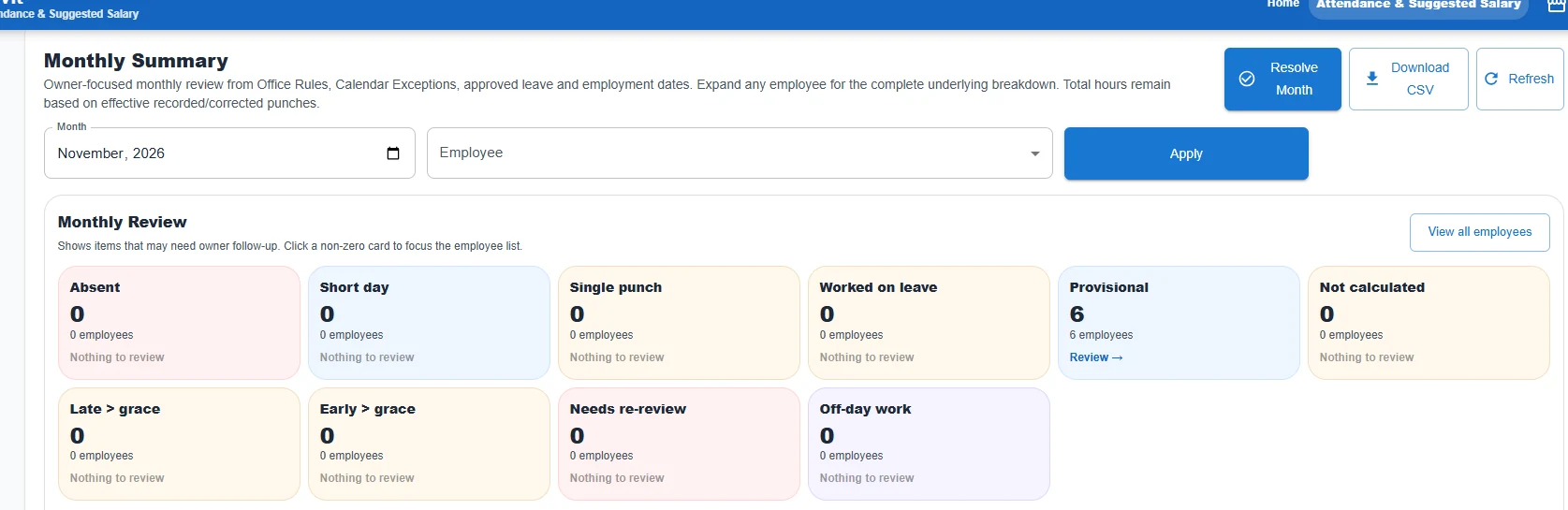
The intended Kavit workflow is:
Attendance -> Leave -> Monthly Attendance review -> Suggested Salary -> Finalized Salary History
Attendance does not silently become salary.
The owner or authorized user can review attendance exceptions and the monthly position before salary is finalized.
Shared attendance phone vs biometric attendance machine
A traditional biometric machine may still be appropriate for some organisations.
But a small office should ask what problem it is actually trying to solve.
If the requirement is:
- a common workplace attendance point;
- employee identity evidence;
- location verification;
- cloud visibility;
- attendance history;
- leave integration; and
- salary review,
a registered Android attendance device may remove the need to buy dedicated biometric hardware purely to capture daily punches.
The decision should not be based on which technology sounds more advanced. It should be based on whether the daily attendance workflow is reliable, understandable and easy for employees to use.
For a deeper comparison, read Biometric Attendance vs Mobile Attendance App in India.
Privacy questions a business should ask
Does Kavit continuously track employees?
No. Location is checked when required for attendance-related security events. Kavit is not positioned as continuous employee-location tracking.
Does an employee need a personal Kavit login to punch on the office phone?
No. Shared Office attendance is designed so employees can mark attendance on the approved shared device without an individual Kavit application login.
Is the selfie stored forever?
No. The current attendance requirement retains selfie evidence for 40 days and then deletes the image while preserving the attendance record.
Is face recognition required?
No. The current attendance acceptance flow does not require face-recognition or liveness matching.
Questions about shared-device attendance
Can multiple employees use the same attendance phone?
Yes. That is the purpose of the Shared Office model. The approved office device can present eligible employees for selection before the attendance event is captured.
Can the phone still be used for normal Kavit business work?
Yes, where the signed-in Google account has normal Kavit permissions. Attendance-device authorization and ordinary Kavit user permissions are separate controls.
What happens after one employee punches?
The success screen offers Next Employee, so the shared phone can immediately return to the attendance flow for the next person.
Can one business use more than one Shared Office phone?
Yes. Kavit’s workforce requirements allow one or more shared office Android attendance devices to be registered to a store.
Does Shared Office attendance work across multiple branches?
Each Attendance device is tied to its approved business/store and location context. A multi-location business can configure appropriate attendance locations and devices rather than treating every phone as an unrestricted attendance device.
A practical Shared Office attendance checklist
Before rolling a shared attendance phone out to employees, test the real workflow:
- Pair the office phone to the correct business.
- Assign the correct Attendance location.
- Confirm GPS works reliably at the actual attendance point.
- Mark attendance with a real employee.
- Confirm the live selfie is captured.
- Verify the success screen and server time.
- Confirm the punch appears in Kavit Web.
- Check first punch, last punch and work-time calculations.
- Verify the monthly Attendance view.
- Confirm administrators know how corrections and device deactivation work.
Do this with the actual phone that will stay at the office.
A technically correct attendance setup that is frustrating every morning is still a bad attendance setup.
The simple idea behind Kavit Shared Office Attendance
For a fixed-location small business, the model can be straightforward:
Keep one approved Android phone at the workplace. Let employees select their name, verify the workplace, take a live selfie and mark attendance. Let the owner see the resulting attendance centrally.
That is what Kavit Shared Office Attendance is designed to do.
If your team works from a shop, office, clinic, warehouse or workshop and you want to move away from registers or a standalone attendance machine, explore Kavit Attendance & Salary.
Kavit currently offers a 60-day free period so a business can test the workflow in its real workplace before deciding whether it fits.
Turn attendance records into a simpler monthly workflow.
See how Kavit brings together Shared Office and eligible Personal Mobile attendance, workplace location checks, leave and salary review.
Related attendance guides
A practical attendance system for small businesses: what to get right first
A practical guide to attendance setup, geofencing, selfie evidence, leave, corrections and salary review for small teams.
GPS Attendance for Multiple Locations: A Practical Guide for Small Businesses
How GPS and geofencing can help SMEs manage employee attendance across offices, stores, warehouses and multiple branches without continuous location tracking.
Biometric Attendance vs Mobile Attendance App: Which Is Better for Small Businesses in India?
Compare biometric attendance machines and mobile attendance apps on cost, maintenance, cloud access, GPS, multiple locations and salary workflows for Indian SMEs.